
Operation LARPnet: my mini rack

PCs, laptops, cyberdecks, homelabs, servers, modems, routers, switches, keyboards, mice, etc.

Moderator: Onio

Post Reply
User avatar
Onio
Posts: 128
Joined: Sat May 23, 2026 10:48 pm
Contact:

Operation LARPnet: my mini rack

Post by Onio »

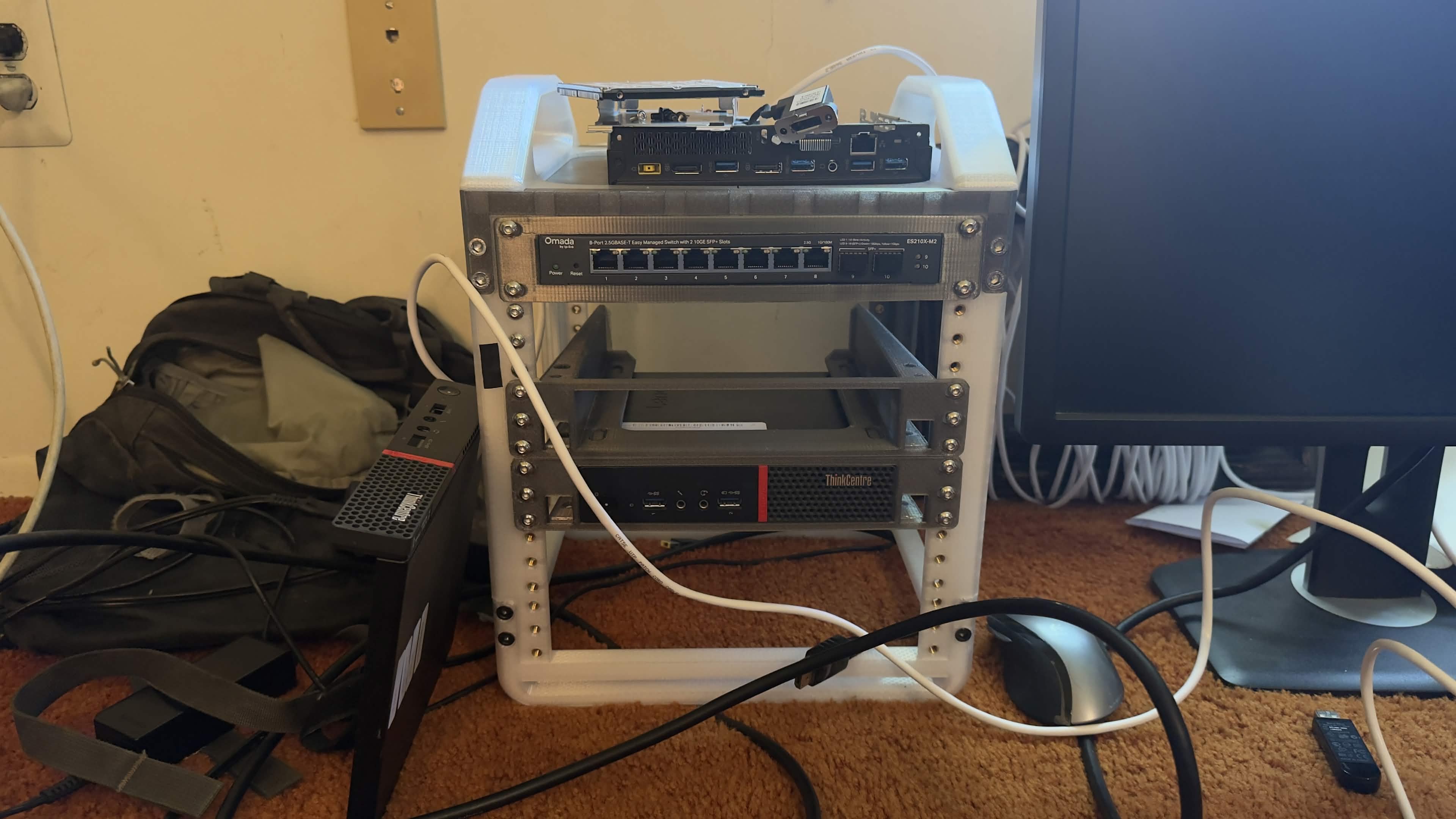
This is operation LARPnet - I call it this because I have no idea what I'm doing and I began working on it simply because it looks cool and I thought it would make me seem cooler. I'm following some vague vision of freedom, privacy, a desire to self-host, better understand networking, and creating a central hub for all of my files (hopefully, eventually). A miniature data center is sort of my goal, in the form of a tiny rack.

I'm learning a lot and simultaneously forgetting what I'm learning, so this forum topic will serve teh additional role of documenting & organizing ideas, concepts, and info that I'm likely to forget or get jumbled up unless I write it down.
Image

The rack itself is 3d printed, I used the KWS model found here and some transparent PETG using the original Elegoo Centauri Carbon inside of a grow tent that has an extractor fan pulling all the highly concentrated VOCs out of my garage and into the air where they become rapidly diluted. That was a pretty fun build. I really like the KWS Rack because it's expandable in size and I can print additional parts for additional space as it grows.

The computer you see mounted in this case is a ThinkCentre M900 Tiny with an i7-6700T cpu, 16gb ram, 512gb SSD and I am not entirely sure what I'll be doing it with yet. It'll be the brains to some stuff. The computer on the top, which has its cover removed, is a ThinkCentre M700 Tiny, i3-6100T, 8gb ram. I purchased both of these for $50 each. Also mounted at the top of the rack is a TPLink Omada managed switch, which was totally necessary for reasons I totally understand (please don't ask me about it yet, I'll figure out reasons why it was needed in the future.) For the more advanced users amongst us, you can totally justify my purchase by replying to this post.

Today I am most excited about the M700 Tiny i3 on top. Right now I'm using the basic default modem/router combo that the ISP handed over. My goal is to replace that with a dedicated modem and a dedicated router. Modems can't be built by hobbyists, they're essentially blackboxed. However, routers totally can be, and tech gurus are encouraging it in response to the U.S. blacklisting a ton of consumer grade routers. Your own homebrewed router should provide more control over firewall rules, dns, vpns + adblocking at the router level, network monitoring & logging, and more control over setting up multiple networks and points of access. For the software, I'll be installing pfSense.

I'm also excited about using the M700 Tiny for this because I'm privileged to offer a dated business mini computer a second lease on life. This is a machine that few others will find a useful purpose for, but for a home router, it's actually pretty beefy and can run a ton of things I'd like it to run. I've been interested in an idea that I've only recently learned there was a term for - permacomputing - which is essentially just using a device beyond its mythical 'useful lifespan' (defined by its ability to use the most modern bloated software) and carrying out its usage through the entirety of its actual physical lifespan, which is often far, far longer.

Another example of permacomputing might be using something like a ThinkPad 760XL as a writer's deck. The 760Xl was released in 1997, had a wonderful keyboard, and ran Windows 98. It can't connect to the Internet anymore and there is no modern software for it, effectively becoming useless for most people way back in the early 2000s, but it still boots up in 2026 and if you need a device to write a novel on without any distractions, it's great for that!

The only issue with the M700 Tiny is that it only has one NIC - Network Interface Card - and a router needs at least two. Thankfully, the M700 has a removable displayport in the back, and some clever humans have created this useful device, a NIC which I can screw into the back where the displayport used to go, and plugs into the M700's empty wireless port. Now I'll be able to run ethernet cable from my modem into this device, serve as a sort of traffic director and a security checkpoint, and then back out into the managed switch, where all my other computers and maybe a wifi access point can connect to.

This router is step one in the building out of my little data center, and my exploration of networking in general, and I'm pretty excited to get it up and running. For now, I must wait for that NIC to arrive, so I'll pause with this post. I'll continue to update so you can monitor the situation (guide/assist/yell at me) as further events develop.


EDIT:

The little NIC I linked to above arrived, it took about 5 minutes install and put back together, I spent the rest of the evening installing pfSense and configuring the M700 as my firewall/router. I plugged it into the TPLink ES210X-M2 and my computer is now connected through that. It was an easier process to set up than I expected, but I'm overwhelmed with all of the settings/options on pfSense.

User avatar
Artilus
Posts: 5
Joined: Tue Jun 09, 2026 11:17 am

Re: Operation LARPnet: my mini rack

Post by Artilus »

If you are trying to build your own router and server, then this Guide might prove useful, it's a lengthy read, I myself didn't read all of it, it was not what I was looking for.

I must say, I'm not qualified to judge if this guide is good or nah. :P

There is a video form too:
Part 1 :
Part 2 :
User avatar
Onio
Posts: 128
Joined: Sat May 23, 2026 10:48 pm
Contact:

Re: Operation LARPnet: my mini rack

Post by Onio »

Artilus wrote: Tue Jul 07, 2026 12:25 pm If you are trying to build your own router and server, then this Guide might prove useful, it's a lengthy read, I myself didn't read all of it, it was not what I was looking for.
This actually is useful! I wound up getting through the installation of the pfSense and the M700 is now operating as my router, but there is a lot left in this guide that will point me in the right direction. Thanks for sharing this, Artilus, I really appreciate it! Did you end up building out a homelab of your own?

Update: Went ahead and set up the M900

Despite previously wanting to wait until I've obtained adequate storage, I decided to throw a 10-year-old SanDisk 512gb SSD into the M900, boot it up for the first time since I bought it maybe a month or so ago, changed a few settings in bios and it's running fine.

I chose ProxMox and set up Ubuntu in a virtual machine. This is my first time using ProxMox' web UI, it's fairly intuitive and it looks like there's a lot of options there. I've mounted the device back into the rack and it looks like I have my "first" hardware server up and running (aside from a ThinkPad T430 and M700 previously running Fedora SE for a short term)!
User avatar
Onio
Posts: 128
Joined: Sat May 23, 2026 10:48 pm
Contact:

Re: Operation LARPnet: my mini rack

Post by Onio »

I got my first service up and running, sorta: a CryptPad instance. Yesterday I wasted a lot of time dealing with a double NAT scenario and trying to get pfSense to accept a private IP from my laptop. I really just wanted to see what it would feel like to connect to it from my laptop wirelessly, but after trying to set that up for longer than I should have, I realized it would be better to focus my time on setting up the network properly instead.

Right now, my home network currently looks like this:

Image

Please bear with the mismatched icons :lol:
All laptops are connecting downstream from the ISP's modem.router, and WAN side of the pfSense router. Behind the pfSense router is a network switch, my computer, and a server. My computer can properly access CryptPad on the server, but the laptops upstream of the pfSense router were having a difficult time. I managed to portforward (on pfsense router) to the extent that I could access the front page of CryptPad wirelessly through my MacBook (wan-side of pfsense) by typing in the IP address assigned to the pfsense machine by the ISP's router, but it refused any login attempts to my CryptPad accounts.

I think what I will eventually do is add a wifi access point behind the pfsense router, put the ISP gateway into bridge mode, and have the pfsense router take care of everything. Y'know, the proper way:
Image

End goal here is to just get CryptPad to replace Google Docs for me, to be able to access this from anywhere, likely using wireguard. I currently write my scripts for my videos on Docs out of habit and because I like to access them from any machine, so if I'm able to replace that, I'll be super happy!

I also received this lovely CRT from a friend yesterday, it's an AOC Spectrum from the 90s:

Image

I don't know if I'll keep it next to homelab, I don't think the homelab needs its own monitor, but they sure look cool next to one another!

Image
Post Reply