
I'm learning a lot and simultaneously forgetting what I'm learning, so this forum topic will serve teh additional role of documenting & organizing ideas, concepts, and info that I'm likely to forget or get jumbled up unless I write it down.
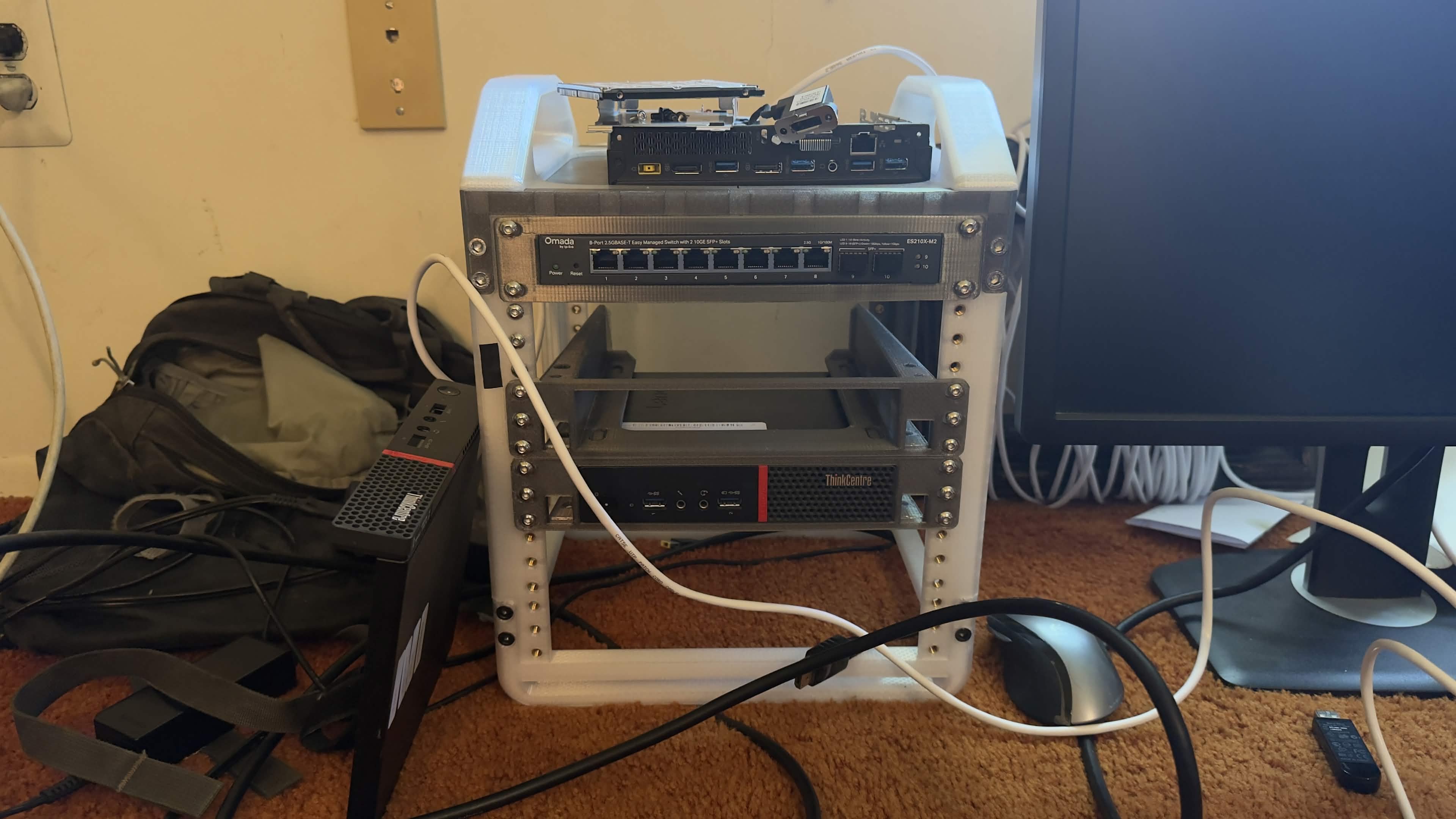
The rack itself is 3d printed, I used the KWS model found here and some transparent PETG using the original Elegoo Centauri Carbon inside of a grow tent that has an extractor fan pulling all the highly concentrated VOCs out of my garage and into the air where they become rapidly diluted. That was a pretty fun build. I really like the KWS Rack because it's expandable in size and I can print additional parts for additional space as it grows.
The computer you see mounted in this case is a ThinkCentre M900 Tiny with an i7-6700T cpu, 16gb ram, 512gb SSD and I am not entirely sure what I'll be doing it with yet. It'll be the brains to some stuff. The computer on the top, which has its cover removed, is a ThinkCentre M700 Tiny, i3-6100T, 8gb ram. I purchased both of these for $50 each. Also mounted at the top of the rack is a TPLink Omada managed switch, which was totally necessary for reasons I totally understand (please don't ask me about it yet, I'll figure out reasons why it was needed in the future.) For the more advanced users amongst us, you can totally justify my purchase by replying to this post.
Today I am most excited about the M700 Tiny i3 on top. Right now I'm using the basic default modem/router combo that the ISP handed over. My goal is to replace that with a dedicated modem and a dedicated router. Modems can't be built by hobbyists, they're essentially blackboxed. However, routers totally can be, and tech gurus are encouraging it in response to the U.S. blacklisting a ton of consumer grade routers. Your own homebrewed router should provide more control over firewall rules, dns, vpns + adblocking at the router level, network monitoring & logging, and more control over setting up multiple networks and points of access. For the software, I'll be installing pfSense.
I'm also excited about using the M700 Tiny for this because I'm privileged to offer a dated business mini computer a second lease on life. This is a machine that few others will find a useful purpose for, but for a home router, it's actually pretty beefy and can run a ton of things I'd like it to run. I've been interested in an idea that I've only recently learned there was a term for - permacomputing - which is essentially just using a device beyond its mythical 'useful lifespan' (defined by its ability to use the most modern bloated software) and carrying out its usage through the entirety of its actual physical lifespan, which is often far, far longer.
Another example of permacomputing might be using something like a ThinkPad 760XL as a writer's deck. The 760Xl was released in 1997, had a wonderful keyboard, and ran Windows 98. It can't connect to the Internet anymore and there is no modern software for it, effectively becoming useless for most people way back in the early 2000s, but it still boots up in 2026 and if you need a device to write a novel on without any distractions, it's great for that!
The only issue with the M700 Tiny is that it only has one NIC - Network Interface Card - and a router needs at least two. Thankfully, the M700 has a removable displayport in the back, and some clever humans have created this useful device, a NIC which I can screw into the back where the displayport used to go, and plugs into the M700's empty wireless port. Now I'll be able to run ethernet cable from my modem into this device, serve as a sort of traffic director and a security checkpoint, and then back out into the managed switch, where all my other computers and maybe a wifi access point can connect to.
This router is step one in the building out of my little data center, and my exploration of networking in general, and I'm pretty excited to get it up and running. For now, I must wait for that NIC to arrive, so I'll pause with this post. I'll continue to update so you can monitor the situation (guide/assist/yell at me) as further events develop.
EDIT:
The little NIC I linked to above arrived, it took about 5 minutes install and put back together, I spent the rest of the evening installing pfSense and configuring the M700 as my firewall/router. I plugged it into the TPLink ES210X-M2 and my computer is now connected through that. It was an easier process to set up than I expected, but I'm overwhelmed with all of the settings/options on pfSense.